Agar aap roz Microsoft Word mein assignments, reports, proposals, articles ya business documents banate hain, to ab AI ko alag browser tab mein open karke copy-paste karne ki zaroorat kam ho sakti hai.
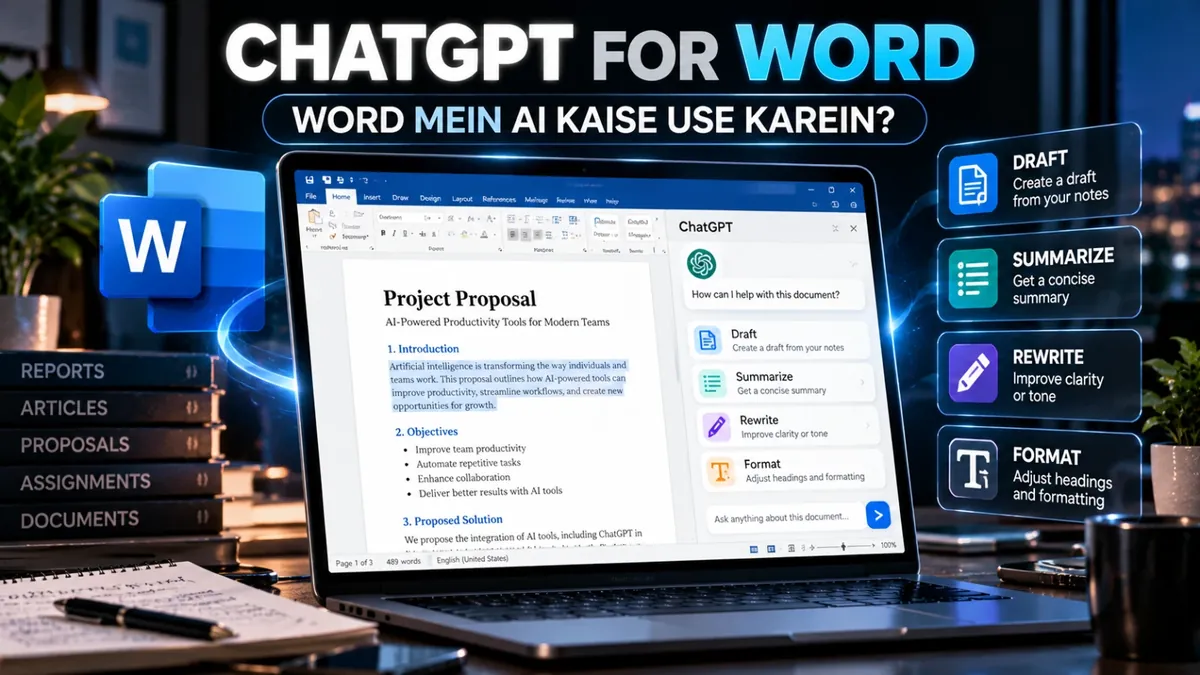
OpenAI ne September 17, 2026 ko ChatGPT for Word introduce kiya. Is integration ke through users Microsoft Word ke andar ChatGPT se document draft karwa sakte hain, content summarize kar sakte hain, selected text ko rewrite kar sakte hain aur headings aur formatting adjust kar sakte hain. 1
ChatGPT for Word Kya Hai?
ChatGPT for Word Microsoft Word ke liye ChatGPT add-in hai jo AI assistance ko directly Word ke workflow mein laata hai.
Normally agar aapko Word document improve karna ho to aap text copy karke ChatGPT mein paste karte hain, response copy karte hain aur phir Word mein wapas paste karte hain. ChatGPT for Word ka objective is workflow ko simpler banana hai.
OpenAI ke mutabiq Word integration se aap notes se draft create, documents summarize, selected text revise aur headings/formatting adjust kar sakte hain. 2
ChatGPT for Word Mein Kya Kar Sakte Hain?
- Draft: Apne notes se document ka initial draft create karna.
- Summarize: Long document ka concise summary banana.
- Rewrite: Selected text ko clearer ya different tone mein rewrite karna.
- Formatting: Headings aur document formatting ko improve karna.
- Edit: Existing content ko revise karna.
Ye features especially un logon ke liye useful ho sakte hain jo regularly long documents ke sath kaam karte hain.
ChatGPT for Word Kaise Use Karein?
- Microsoft Word open karein.
Apne computer par Microsoft Word launch karein. - ChatGPT add-in install karein.
Microsoft Marketplace se ChatGPT for Word add-in install karein. - ChatGPT account se sign in karein.
Add-in open karke apne ChatGPT account se sign in karein. - Apna document open karein.
Existing document select karein ya new Word document create karein. - ChatGPT ko instruction dein.
For example: “Is introduction ko professional aur concise bana do.” - Output review karein.
AI-generated content ko blindly accept karne ke bajaye facts, names, numbers aur context verify karein.
OpenAI ke current release notes ke mutabiq ChatGPT for Word all ChatGPT plans, including Free, ke liye available hai. Plan ki normal usage limits apply hoti hain. 3
Students Ke Liye ChatGPT for Word
Students Word mein assignments, reports aur research documents par kaam karte hain, isliye integration unke workflow ko simplify kar sakta hai.
For example, agar aapke paas lecture notes hain to aap unhein structured draft mein convert karne ke liye AI assistance le sakte hain. Long document ke key points ka summary bhi generate kiya ja sakta hai.
Lekin academic work mein AI-generated information ko verify karna aur apne institution ki AI-use policy follow karna important hai.
Freelancers Ke Liye ChatGPT for Word
Freelancers ke liye Word mein directly AI access karna proposals, reports, content drafts aur client documents ke workflow ko simplify kar sakta hai.
For example, aap rough client notes ko professional proposal structure mein convert karne ke liye ChatGPT use kar sakte hain. Existing document ko concise karna ya tone adjust karna bhi possible hai.
Businesses Isay Kaise Use Kar Sakte Hain?
Small businesses aur teams Word mein frequently proposals, SOPs, reports aur internal documents create karte hain.
ChatGPT for Word ka use initial drafts, document summaries aur editing assistance ke liye kiya ja sakta hai. Sensitive company information ko AI tools mein use karte waqt organization ki privacy aur data policies ko zaroor consider karein.
ChatGPT for Word Free Hai?
OpenAI ke current release notes ke mutabiq ChatGPT for Word Free users samet all ChatGPT plans par available hai. Lekin har plan ki usage limits aur available capabilities different ho sakti hain. 4
Isliye agar aap sirf basic Word documents ke liye AI assistance chahte hain to pehle apne existing ChatGPT account se feature check karna sensible hai.
ChatGPT for Word vs Normal ChatGPT
| Normal ChatGPT Workflow | ChatGPT for Word |
|---|---|
| Word se text copy karna | Word ke workflow ke andar AI assistance |
| Browser/app switch karna | Word ke andar kaam karna |
| Response copy karke Word mein paste karna | Document editing workflow ke sath integrated |
| General AI conversation | Document-focused assistance |
AI Se Word Document Banwate Waqt Ye Galti Na Karein
AI integration convenient hone ka matlab ye nahi ke har generated sentence automatically correct hai.
Especially business reports, academic assignments, financial documents aur client proposals mein facts, numbers, citations aur names manually verify karein.
AI ko first draft aur editing assistant ke taur par use karna practical hai, lekin final responsibility user ki hoti hai.
Pakistan Mein ChatGPT for Word Kaise Useful Hai?
Pakistan mein students, freelancers, agencies, online businesses aur office professionals Microsoft Word ko daily basis par use karte hain. Isliye Word ke andar AI assistance ka workflow local users ke liye bhi practical ho sakta hai.
Especially freelancers ke liye proposals aur reports, students ke liye research documents aur businesses ke liye SOPs aur presentations ki preparation mein AI assistance time save kar sakti hai.
Final Thoughts
ChatGPT for Word ka biggest benefit ye hai ke AI assistance ko document workflow ke closer la diya gaya hai. Drafting, summarizing, rewriting aur formatting jaise tasks ke liye users ko baar baar Word aur ChatGPT ke darmiyan switch karne ki zaroorat kam ho sakti hai.
Agar aap Word mein regular documents create karte hain to apne ChatGPT account mein ye integration check karna worth trying hai. Aur agar aap AI ke sath content creation, design, editing aur productivity ke liye aur tools explore karna chahte hain, to Saste Tools ke available digital tools check karein →