Custom QR Code Kaise Banayein? Burger, Pizza, Coffee Aur 20+ Shapes Mein
QR code har jagah use hota hai — restaurant menus, business cards, product packaging, social media aur shop displays mein. Lekin traditional black-and-white QR codes har brand ke visual style ke saath match nahi karte.
Agar aap apne business ke liye thora creative aur recognizable QR code banana chahte hain, to Custom Shape QR Code Generator try kar sakte hain. Is mein QR ke dots selected shape ke saath merge ho jate hain, jis se normal QR ke bajaye business-relevant design create hota hai.
Custom Shape QR Code Kya Hota Hai?
Custom Shape QR ek aisa QR code hai jisme traditional square-style appearance ke bajaye different business ya interest-based shapes use ki ja sakti hain.
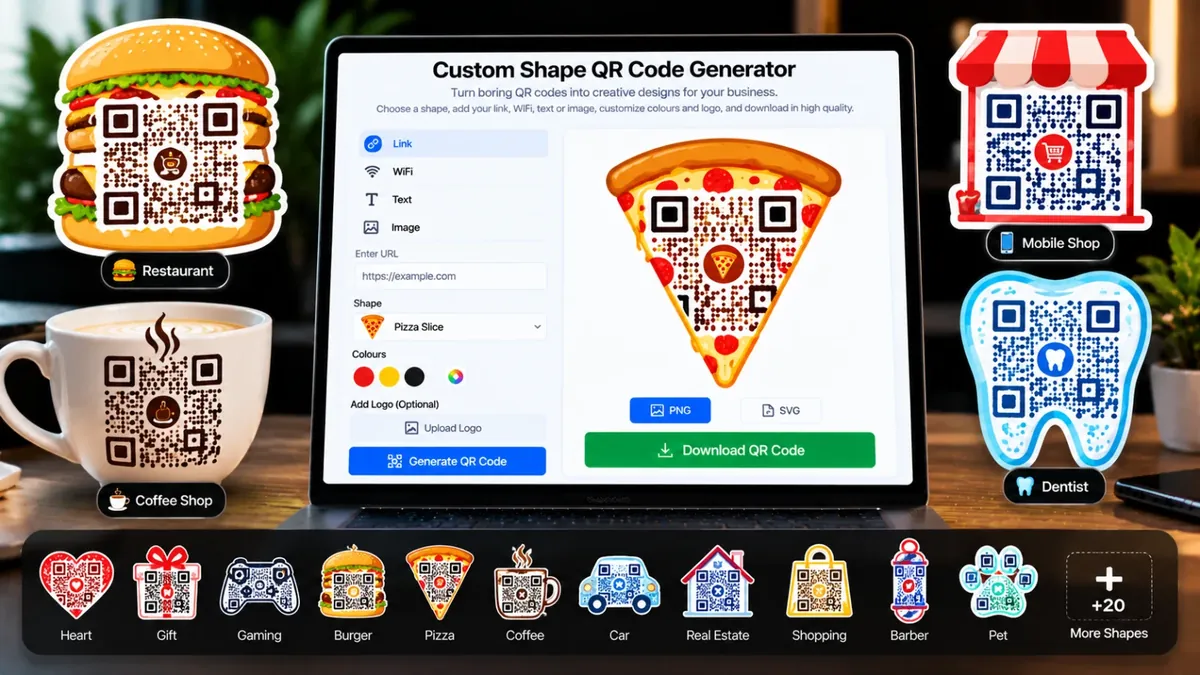
For example, restaurant ke liye burger ya pizza shape, coffee shop ke liye coffee mug aur dentist ke liye tooth shape use ki ja sakti hai.
Iska basic idea simple hai: QR code ki functionality ko maintain karte hue uski visual appearance ko zyada relevant aur memorable banana.
20+ Shapes Mein QR Code Banayein
Custom Shape QR Code Generator mein 20 se zyada shapes available hain, is liye different businesses apne niche ke mutabiq design choose kar sakte hain.
Examples mein ye shapes shamil ho sakti hain:
- Burger
- Pizza
- Coffee mug
- Barber
- Dentist
- Mobile shop
- Gaming
- Gift
- Heart
- Shopping
- Car
- Real estate
- Pet
Aur is ke ilawa bhi 20 se zyada creative shapes available hain.
Custom QR Code Mein Kya Add Kar Sakte Hain?
Sirf shape hi customize nahi hoti. Aap different types ka QR content bhi create kar sakte hain.
- Website ya link
- WiFi information
- Text
- Image
Iska matlab hai ke aap QR ko apni actual requirement ke according create kar sakte hain.
Custom QR Code Kaise Banayein?
QR code create karne ka process simple hai:
- Custom Shape QR Code Generator open karein.
- QR ka type select karein — Link, WiFi, Text ya Image.
- Required information enter karein.
- Apni business-relevant shape choose karein.
- QR ke colours customize karein.
- Agar zaroorat ho to apna logo add karein.
- QR generate karein.
- Final design ko PNG ya SVG format mein download karein.
Restaurant Ke Liye QR Code Idea
Restaurant ke liye traditional QR ke bajaye burger ya pizza shape interesting choice ho sakti hai.
For example, aap menu link ka QR code pizza shape mein create karke table tent ya takeaway packaging par print kar sakte hain.
Is tarah customer ko QR dekh kar bhi idea mil sakta hai ke ye restaurant-related content ke liye hai.
Coffee Shop Ke Liye QR Code
Coffee shop ke liye coffee mug shape ka QR code use kiya ja sakta hai. Is QR ko menu, loyalty material, counter display ya packaging par place kiya ja sakta hai.
Aap QR ke colours ko bhi apne overall brand design ke saath coordinate kar sakte hain.
Barber Ya Dentist Ke Liye QR Code
Service businesses bhi custom shapes ka advantage le sakte hain.
Barber shop ke liye barber-related shape aur dental clinic ke liye tooth shape QR use kiya ja sakta hai. Is se QR ka purpose visual level par bhi samajhna easy ho sakta hai.
Logo Aur Colours Add Karein
Agar aap apne business ke branding elements QR mein include karna chahte hain, to colours customize kar sakte hain aur logo bhi add kar sakte hain.
Lekin QR design mein creativity ke saath readability bhi important hai. Final QR ko real-world use se pehle scan karke test karna achi practice hai.
PNG Ya SVG — Kaunsa Format Choose Karein?
Tool se QR code ko PNG ya SVG format mein download kiya ja sakta hai.
PNG digital use ke liye convenient ho sakta hai, jabke SVG scalable format hone ki wajah se print designs aur different sizes ke creative work mein useful ho sakta hai.
Business Mein Custom QR Code Kahan Use Karein?
Custom QR codes ko different business touchpoints par use kiya ja sakta hai:
- Restaurant menus
- Business cards
- Product packaging
- Shop counters
- Flyers aur posters
- Social media promotional material
- Event displays
QR mein jo content hai, uske mutabiq placement choose karein. For example, website link ke QR ko business card par aur menu QR ko restaurant table par place kiya ja sakta hai.
Custom QR Banate Waqt Important Tip
QR ko sirf attractive banana enough nahi. Usay properly scan bhi hona chahiye.
Download karne ke baad QR ko different phones se test karein, especially agar aap usay print karke customers ko dene wale hain. Shape, colours aur logo add karte waqt scanability ko priority dein.
Final Tip
Agar aapka business traditional QR code se thora different aur branded look chahta hai, to Custom Shape QR Code Generator se experiment karein.
Link, WiFi, text ya image select karein, business ke according shape choose karein, colours aur logo customize karein aur final QR ko high-quality PNG ya SVG mein download kar lein.
Simple rule: QR sirf scan hone wala code nahi — sahi design ke saath ye aapke business ka visual touchpoint bhi ban sakta hai.