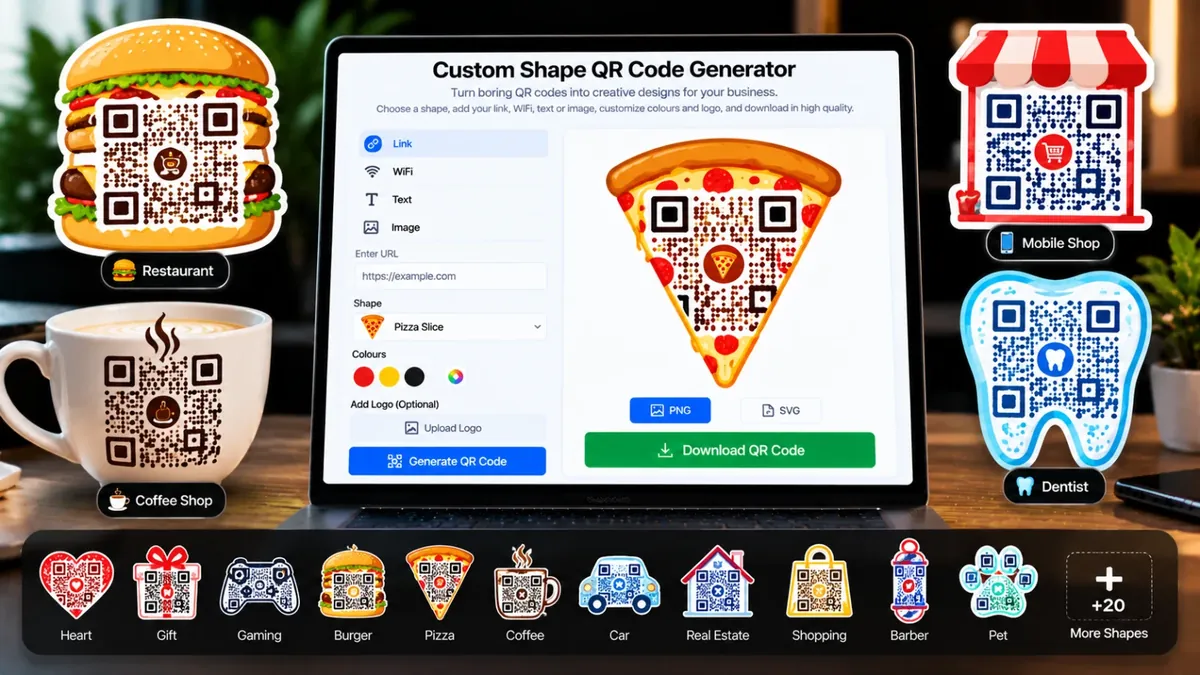
Boring black-and-white QR ki jagah apne business ki shape ka QR banayein: burger, pizza, barber pole, coffee mug, dentist, mobile shop, ghar, car, medical, jewellery, camera aur 35 se zyada shapes. QR ke dots shape mein merge ho jate hain. Link, WiFi, text ya image ka QR, colours aur logo ke saath, high quality PNG ya SVG download karein.
Image hamare server par upload hoti hai aur QR scan karne par wahi image khulti hai. Sirf wohi image daalein jo aap ki apni ho ya jis ki ijazat ho.
QR scan karte hi seedha is number ki WhatsApp chat khul jati hai. Number 03001234567 likhein ya +923001234567, dono chalte hain.
Dotted Shape mein QR shape ke andar merge ho jata hai aur baqi barik dots usi grid mein shape bana dete hain, koi khali white jagah nahi. QR poora safe rehta hai, is liye wo scan hota hai. Rang Design section mein badal sakte hain.
PNG high quality image hai. Print ke liye SVG behtar hai, ye kitna bhi bara karo dhundla nahi hota. Print se pehle QR ko apne phone se scan kar ke check zaroor karein.
Plain black-and-white QR codes look the same everywhere. This free tool turns your QR into a custom shape that matches your business: a burger or pizza for fast food and restaurants, a barber pole or mirror for barber shops and salons, a coffee mug for a cafe, a cupcake for a bakery, a tooth for a dentist, a gear for a garage, a kettlebell for a gym, a phone for a mobile shop, a shopping bag or store front for retail, a paw for pet shops, plus a heart, map pin, shield, chat bubble or sale starburst.
Pick what the QR should contain (a website link, text, an image, WiFi login, email or phone number), choose a shape, then set the shape colour, QR colour, dot style and your own logo. Download a high quality PNG (up to 3000 px, with transparent background if you like) or an SVG for printing. Choose Dotted Shape, where the QR merges into the shape and fine dots fill the rest of the silhouette, or Solid Badge, where the QR sits on a card inside a solid shape. A complete, real QR is always kept inside the shape, and the tool runs a scan test so you know it works. Still, always test the final QR with your phone before printing.
Roman Urdu mein: Link, WiFi password, text ya image ka QR code banana ho to ye free generator istemal karein. Apne business ke hisaab se shape wala QR, jaise burger, coffee mug ya barber pole, bhi chun sakte hain, rang aur logo badal sakte hain aur PNG ya SVG download kar sakte hain.
Pick URL, Text, Image, WiFi, Email or Phone and enter your details. The QR appears instantly.
Choose burger, pizza, barber pole, mug, tooth, gear, mobile and more, then pick Dotted Shape or Solid Badge. Or keep the normal QR.
Open Design & Logo to change the shape colour, QR colour, dot style, corners and add your logo.
Download a high quality PNG for sharing or an SVG for printing at any size.
Apna link ya text daalein, "QR Shape" mein se apne business ki shape (maslan burger ya barber pole) chunein, rang set karein aur PNG ya SVG download karein. Poora process free hai, signup nahi chahiye.
Haan. Asal QR shape ke andar mauzood hota hai aur baqi dots usi grid ke hote hain, is liye wo normal QR ki tarah scan hota hai. Tool scan test bhi chalata hai. Phir bhi print se pehle apne phone se scan kar ke check zaroor karein.
Design & Logo kholein, "Logo Chunein" dabayein aur apna logo select karein. Logo QR ke beech mein lagta hai aur error correction khud High ho jati hai.
Abhi 21 ready shapes hain (burger, pizza, cupcake, ice cream, mug, chef hat, barber pole, mirror, store, bag, tooth, gear, kettlebell, mobile, paw, heart, pin, shield, chat bubble, circle, starburst). Aur shapes time ke saath add hoti rahengi.
Haan. Shape chunne ke baad Design mein "Shape ke bahar" ko Transparent rakhein. Shape ke bahar ka hissa transparent rahega, jo sticker ya design mein lagane ke liye behtar hai.
WhatsApp/Instagram par share karne ke liye PNG. Banner, visiting card ya print ke liye SVG, kyunke wo kitna bhi bara karo saaf rehta hai.
"Image" type chunein, apni image upload karein aur QR foran ban jata hai. Jab koi is QR ko scan karta hai to wo image us ke phone mein khul jati hai. JPG, PNG aur WebP images chalti hain.
Sirf Image type mein. Image ko QR se kholne ke liye online rehna zaroori hai, is liye wo hamare server par save hoti hai aur uska random link QR mein jata hai. URL, Text, WiFi, Email aur Phone ke QR aap ke browser mein hi ban-te hain, un ka koi data upload nahi hota.
Logo chhota rakhein aur QR ka rang background se kaafi gehra rakhein. Dark card par light QR kuch scanners par kaam nahi karta. Lamba text bhi QR ko ghana bana deta hai, is liye chhota link rakhein.
Choose the WiFi type, enter the network name and password, pick the security type, choose a shape if you like and download the QR. Guests can scan it with their phone camera to join without typing the password.
The QR codes you generate are yours to use on your own materials. Just make sure the content you encode, including any image you upload, is yours or you have permission to use it.
Link ya text likhein, rang aur shape chunein aur QR banayein. Phir PNG ya SVG download kar lein. Print karne se pehle phone se scan kar ke check zaroor kar lein.
Agar aap ko is se zyada features chahiye hon to ye premium tools Saste Tools par sasti qeemat mein milte hain.