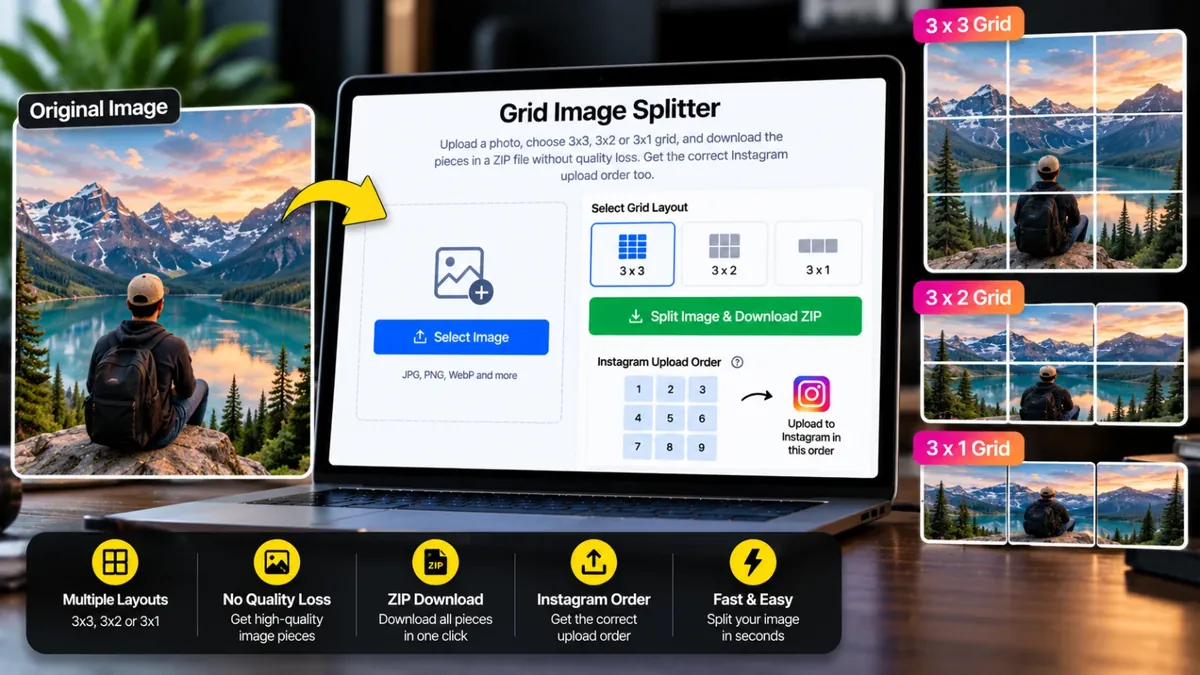
Photo upload karein, 3x3, 3x2 ya 3x1 grid chunein aur bina quality loss ke tukron ko ZIP mein download karein. Instagram par upload karne ka sahi order bhi mil jata hai.
Har tile photo ke asli pixels se kata jata hai, koi resize ya compression nahi (PNG mein). Alag tile download karne ke liye neeche tile par Download dabayein.
An Instagram grid splitter cuts one big photo into equal tiles so that, when you post them one by one, your profile shows the full picture like a puzzle. It is popular for 3x3 profile grids, 3x2 six-post layouts and wide 3x1 panoramas.
Upload your photo, choose 3x3, 3x2, 3x1 or your own grid, and download every tile in a single ZIP. Tiles are cut from the original pixels, so PNG output has no quality loss and there is no watermark. The tool also numbers the tiles in the order you should upload them to Instagram, and your photo never leaves your device.
Roman Urdu mein: Instagram profile par ek bari photo ko 3x3, 3x2 ya 3x1 grid mein dikhana ho to photo upload karein, grid chunein aur sab tiles ek ZIP mein download kar lein. Quality kam nahi hoti aur watermark nahi lagta. Tiles ko sahi tarteeb se post karna yaad rakhein.
Click the box or drag and drop a JPG, PNG or WebP photo.
Pick 3x3, 3x2, 3x1 or a custom grid. Choose Original, 3:4 or 1:1 tiles and check the preview.
Press ZIP Download for all tiles, or download single tiles from the list.
Upload the tiles to Instagram starting from Post 1, so the grid forms the full picture.
Photo upload karein, 3×3 grid chunein aur "ZIP Download" dabayein. Aap ko 9 tiles ek ZIP file mein mil jayengi.
PNG format mein bilkul nahi. Har tile photo ke asli pixels se kati jati hai, na resize hoti hai na compress. JPG chunein to file chhoti hoti hai aur quality bohot achi rehti hai.
Nahi. Koi watermark, koi signup aur koi limit nahi.
Instagram newest post sab se upar dikhata hai. Is liye Post 1 sab se pehle upload karein, phir Post 2 aur isi tarah aage. Tiles par aur ZIP ki file names mein yehi number likhe hain.
Pehla number columns aur doosra rows hai. 3x2 mein 3 columns aur 2 rows (6 posts), 3x1 mein 3 columns aur 1 row (3 posts) hoti hain.
Nahi. Poora kaam aap ke apne browser mein hota hai, photo kisi server par nahi jati.
Instagram profile grids now show 3:4 portrait tiles, so choose "Instagram Portrait 3:4" to get tiles that fill the grid. Choose Original if you do not want any cropping.
Yes. It is free with no watermark and no account. You can use it as often as you like on your phone or laptop.
Photo upload karein, 3x3, 3x2 ya 3x1 grid chunein aur tiles download karein. Instagram par tiles ko ulti tarteeb mein (aakhri tile pehle) post karein taake grid sahi nazar aaye.
Agar aap ko is se zyada features chahiye hon to ye premium tools Saste Tools par sasti qeemat mein milte hain.