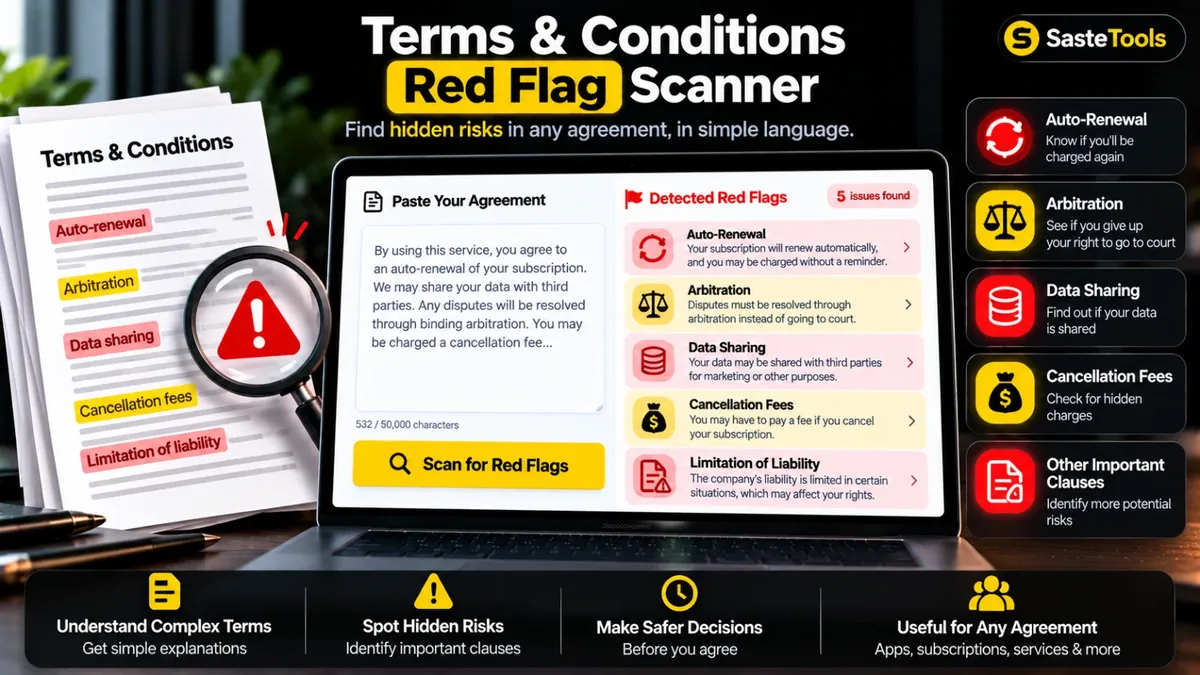
Koi bhi agreement paste karein. Auto-renewal, arbitration, data-sharing jaisi shartein highlight ho jayengi, aur aasan alfaaz mein bataya jayega ke un ka matlab kya hai.
Aap ka text aap ke browser mein hi scan hota hai. Na server par bheja jata hai, na save hota hai. Abhi sirf English agreements scan hote hain.
A terms and conditions red flag scanner reads an agreement for you and points out the clauses that most often hurt ordinary users: subscriptions that renew by themselves, forced arbitration, waivers of class actions, data sharing with advertisers, no-refund rules, price changes at any time and more. Most people accept these agreements without reading them, because they are long and written in heavy legal language.
Paste the text of a Terms of Service, subscription agreement or privacy policy, press one button and get every flagged clause with a plain explanation in simple Roman Urdu and a short tip on what to check. The scan runs inside your browser, so your text is not uploaded or saved. It looks for common English phrases only, so treat the result as a checklist to start from and always read the full agreement yourself. This tool does not give legal advice.
Roman Urdu mein: Lambi terms & conditions parhna mushkil hota hai. Agreement paste karein aur tool auto-renewal, arbitration, data-sharing jaise risky clauses saade alfaaz mein highlight kar deta hai. Ye qanooni mashwara nahi hai. Ahem muaheda sign karne se pehle kisi wakeel se mashwara karein.
Copy the Terms of Service, contract or policy text and paste it into the box.
The tool searches the text for risky clauses such as auto-renewal, arbitration and data sharing.
Each flag shows its severity, what it means in simple words and the exact sentence it was found in.
See your whole agreement with the flagged phrases highlighted, then copy the report if you want to keep it.
Nahi. Yeh tool sirf lafzon ke pattern dhoondta hai aur qanooni mashwara nahi deta. Bari ya ahem agreement sign karne se pehle poora text khud parhein aur zaroorat ho to wakeel se mashwara lein.
Auto-renewal aur free trial ka paid plan mein badalna, forced arbitration, class action aur jury trial ki pabandi, data sharing ya farokht, content par wasee license, terms ya price kabhi bhi badalna, no-refund aur cancellation fee, minimum muddat, jurmana, company ki zimmedari ki had, indemnity, account bina notice band karna, cookies aur court ki location.
Nahi. Sara scan aap ke apne browser mein hota hai. Aap ka text na bheja jata hai na save hota hai.
Is ka matlab hai ke jhagre ki surat mein aap court ke bajaye ek nijee arbitrator ke samne jate hain. Ye aam taur par aap ke court jane ke haq ko kam kar deta hai, is liye dekhein ke opt-out ka koi tareeqa diya gaya hai ya nahi.
Abhi nahi. Scanner English ke aam phrases dhoondta hai. Natije Roman Urdu mein samjhaye jate hain, lekin agreement ka text English mein hona chahiye.
Zaroori nahi. Tool sirf maloom patterns dhoondta hai, is liye kuch shartein nazar se reh sakti hain. Isey pehla qadam samjhein, aakhri faisla nahi.
Agreement ka text paste karein, Scan for red flags dabayein, High severity wali shartein pehle parhein, aur highlighted text mein un ka poora context dekh lein.
Paste the text into this tool and press Scan. It highlights common risky clauses like auto-renewal, arbitration and data sharing and explains each one in simple words. It is a starting checklist, not legal advice.
Nahi. Ye sirf bata sakta hai ke text mein kaun si khaas shartein nazar aati hain. Ahem muahedon ke liye wakeel se mashwara zaroor lein.
Agar aap ko is se zyada features chahiye hon to ye premium tools Saste Tools par sasti qeemat mein milte hain.