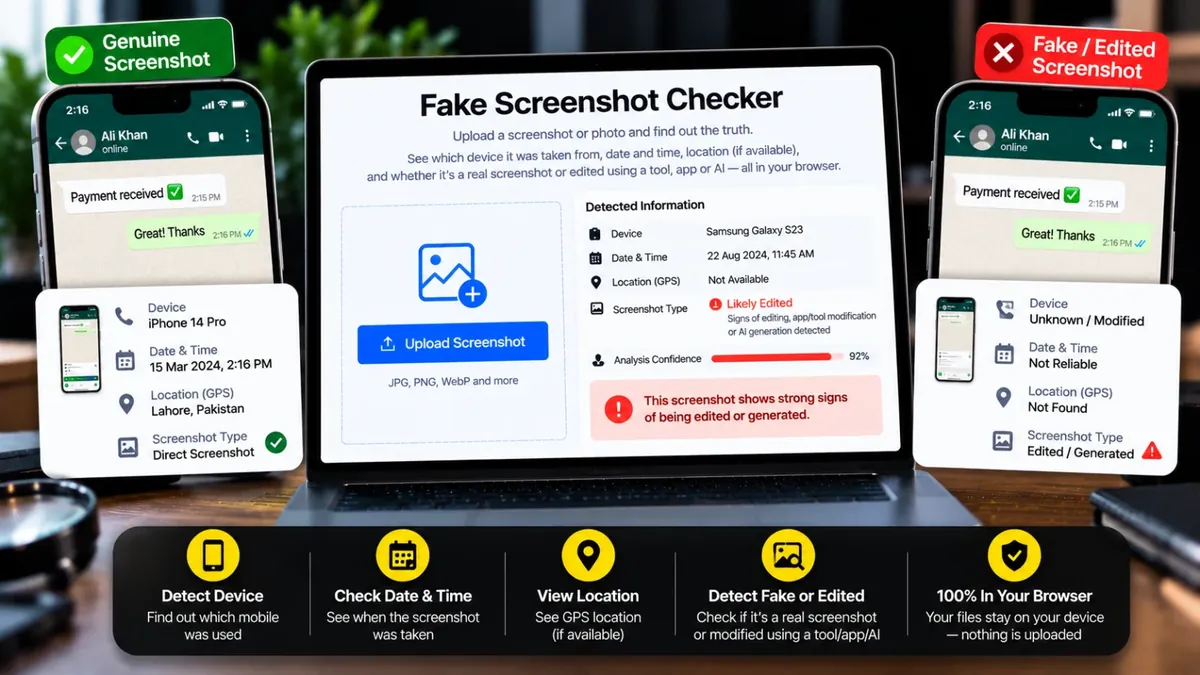
Screenshot ya photo upload karein aur dekhein: kis mobile se li gayi, kis waqt, location (agar maujood ho), aur ye direct screenshot hai ya kisi tool/app/AI se bani hai — sab kuch aap ke apne browser mein.
Fake payment proofs, doctored chats and AI-made images are a common scam tactic. This tool reads the hidden metadata inside a photo or screenshot and shows you the phone model, the date and time it was captured and, when the file still carries it, the GPS location on a map.
It then checks where the image came from: a direct phone screenshot, a camera photo, a file saved from an editing app such as Photoshop or Canva, or an image generated by AI tools. An Error Level Analysis (ELA) heatmap adds a second opinion on JPEG images. Everything runs in your browser and nothing is uploaded. No tool can promise 100% certainty, so always confirm important payments another way.
Roman Urdu mein: Koi screenshot ya photo asli hai ya edit ki gayi, ye jaanchne ke liye tool image ki chhupi maloomaat dikhata hai: phone ka model, waqt, location aur ye ke kisi editing tool ya AI ka nishan mila ya nahi. Ye sirf ek ishara hai, pakka saboot nahi, kyunke maloomaat hata bhi di ja sakti hain.
Click the box, drag and drop, or paste the screenshot or photo you want to check.
You will see whether it looks like a real screenshot, a camera photo, an edited file or an AI image, with the reasons.
The summary cards show the phone model, capture time and GPS location if the file has them.
Scroll down for every field found: camera settings, software, edit history and AI markers.
Nahi. Ye ek indicative tool hai jo metadata aur edit ke signals dikhata hai, lekin advanced editing ya metadata hata di jaye to result kamzor ho jata hai. Bare faisle (paisay bhejna waghera) is akele result par na karein — hamesha doosray zariye se bhi confirm karein.
Camera photos ke andar EXIF metadata hota hai jismein phone ki company aur model likha hota hai. Agar ye data image mein maujood ho to tool wahi dikhata hai.
WhatsApp, Telegram aur Facebook privacy ke liye original metadata hata dete hain. Aisi image mein sirf size, format aur file ka naam wagera hi milta hai. Original image ya "Document" ke tor par bheji gayi file mein ye data bach jata hai.
Sirf tab jab file mein AI ke nishan (jaise Stable Diffusion ki settings ya Content Credentials) maujood hon. Screenshot ya resave hone par ye hat jate hain, is liye "AI ke nishan nahi mile" ka matlab ye nahi ke image asli hai.
Nahi. Poora analysis aap ke apne browser mein hota hai — image kabhi kisi server par nahi jati.
Iska matlab hai image kabhi Photoshop (ya jo bhi app naam se) mein khuli ya save hui thi — ye edit hone ka strong hint hai, lekin ye bhi mumkin hai ke sirf resize ya crop hua ho.
Location tab hi hoti hai jab photo li jate waqt phone ka location on ho aur image kisi platform se guzar kar metadata na khoyi ho. Screenshots mein GPS kabhi nahi hota.
Nahi. Ye sirf nishaniyan dikhata hai. Maloomaat na milne ka matlab ye nahi ke image asli hai, aur milne ka matlab ye nahi ke woh pakka fake hai. Ahem maamlon mein bhejne wale se tasdeeq karein.
Agar aap ko is se zyada features chahiye hon to ye premium tools Saste Tools par sasti qeemat mein milte hain.