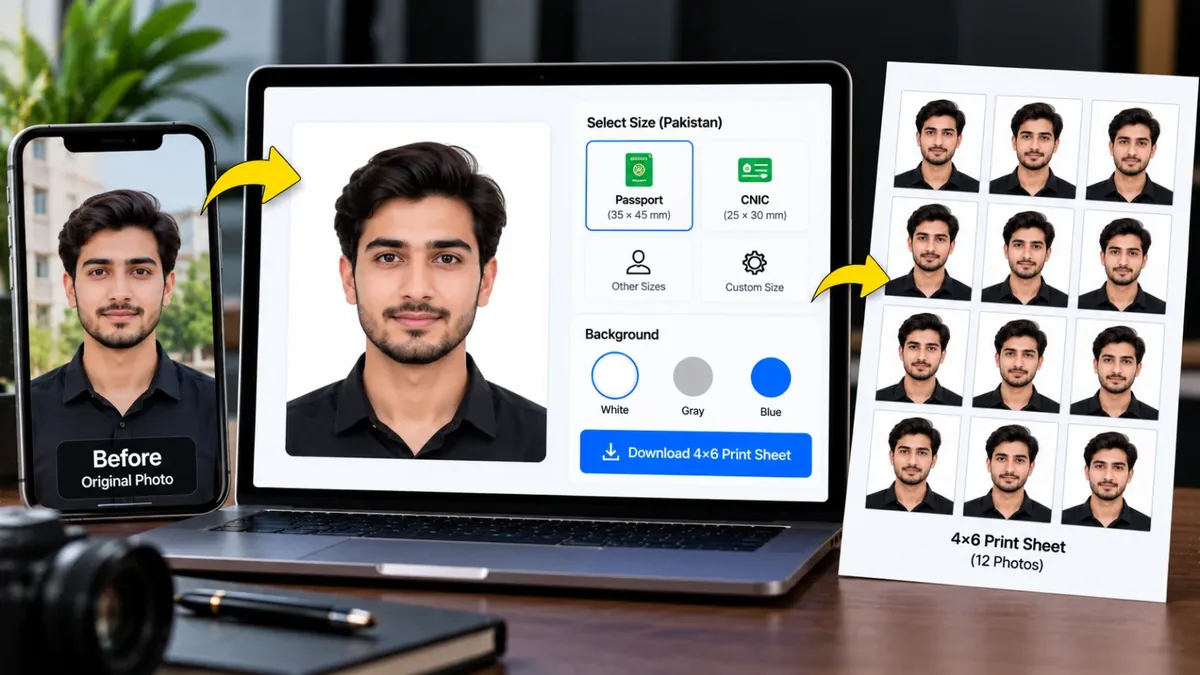
Apni photo upload karein, sahi Pakistan size choose karein, background safed karein aur 4×6 print sheet download karein.
Ungli se khainchein · do ungliyon se zoom · sar oval ke andar rakhein
Sizes har office / embassy ke mutabiq thore alag ho sakte hain — submit karne se pehle apni requirement check kar lein.
Print shop par file dein aur "100% / actual size" par print karwayein. Phir kaat lein — har photo ke gird halka kinara hai.
A passport photo maker crops your picture to the exact size an office asks for, puts it on a plain background and lays several copies on one sheet so you can print them cheaply at any photo shop. This tool has ready sizes for Pakistan passport and CNIC photos, NADRA online uploads, job forms, stamp size and popular visas.
Upload a photo, let the AI remove the background, drag the photo into place inside the head guide and download a single JPG or a print sheet. Everything runs inside your browser, so your face photo is never uploaded to a server. Requirements can differ between offices, so always check the size and background colour your office or embassy asks for.
Roman Urdu mein: Passport, CNIC, NADRA form, job form ya visa ke liye photo ka sahi size aur safed background chahiye? Ye tool Pakistan ke aam sizes ke mutabiq photo banata hai aur 4x6 print sheet bhi tayyar kar deta hai jo aap kisi bhi photo shop se nikalwa sakte hain. Kisi ahem kaam se pehle apne idare ki taza shartein zaroor dekh lein.
Choose a clear, front-facing photo with good light. Sar aur kandhe nazar aane chahiye.
Choose Passport, NADRA, Job form or a visa size, then white or light blue background.
Drag the photo and keep the head inside the guide oval.
Save the single photo (with an optional file size limit) or the 4x6 print sheet.
Pakistan passport ke liye aam tor par 35 x 45 mm ki photo saaf safed background par maangi jati hai. Tool mein yeh size pehle se maujood hai, lekin apne office ki requirement ek dafa zaroor check kar lein.
NADRA online upload ke liye aksar 350 x 467 pixels ki photo maangi jati hai, isliye tool mein yeh preset diya gaya hai. Portal ki requirements badal sakti hain, is liye upload se pehle portal par likhi hui shart dekh lein.
Alag jagah alag requirement ho sakti hai. Tool mein white aur light blue dono backgrounds maujood hain, aap apne NADRA center ya portal ki requirement ke mutabiq choose karein.
Nahi. Crop, background removal aur sheet banana sab kuch aap ke apne browser mein hota hai. Pehli dafa AI model download hota hai, is ke baad bhi photo aap ke device se bahar nahi jati.
Passport size 35 x 45 mm ki 8 photos 4x6 inch sheet par aa jati hain. Copies kam karni hon to Copies menu se tadaad choose karein.
Download se pehle Maximum file size mein Under 100 KB choose karein. Tool quality khud adjust kar ke file ko us limit ke andar rakhta hai.
Nahi, tool sirf crop, zoom aur background ke liye hai. Kuch offices retouching ya filters wali photos qubool nahi karte, is liye photo asli rakhein.
Upload a front-facing photo, choose the Passport size, pick a white background, move the photo inside the guide and download the JPG or the print sheet. No account is needed.
Apni photo upload karein, size chunein (jaise passport ya CNIC), background safed rakhein aur 4x6 sheet download karein. Phir print nikalwa lein. Idare ki shartein (size, kapre, background) pehle check kar lein.
Agar aap ko is se zyada features chahiye hon to ye premium tools Saste Tools par sasti qeemat mein milte hain.