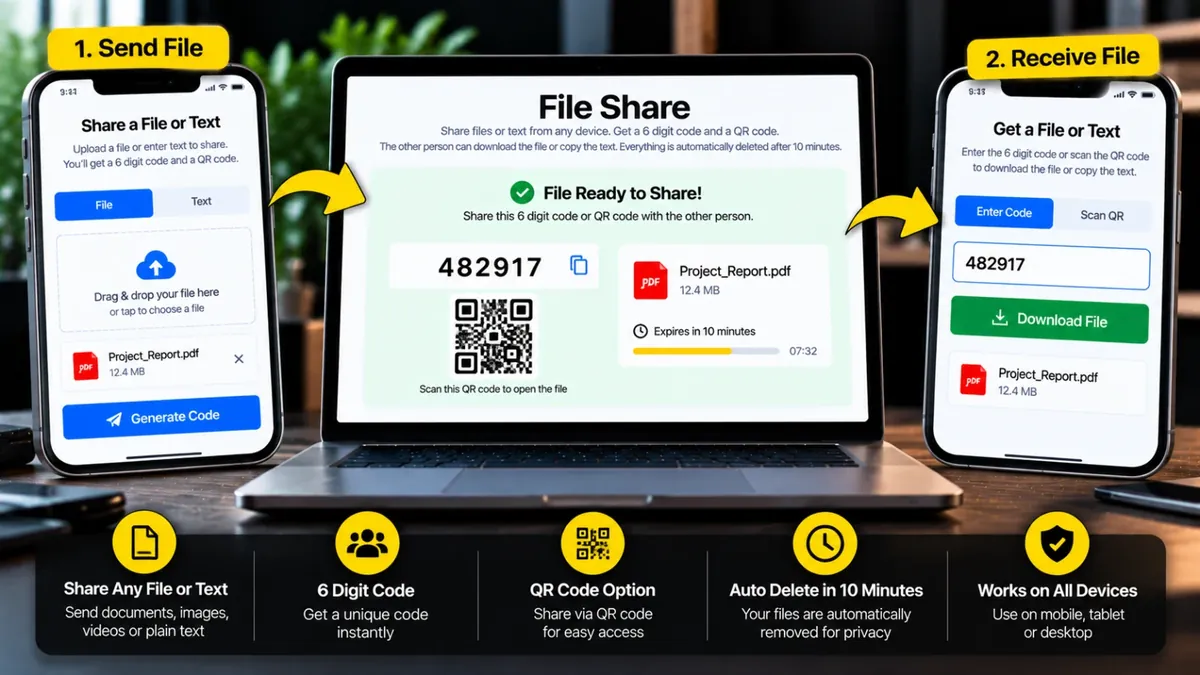
Kisi bhi device se file ya text bhejein, 6 digit code milega. Dusra banda wo code daal kar (ya QR scan kar ke) file download kar le ya text copy kar le. Sab kuch 10 minute baad khud delete ho jata hai.
Dusre phone se scan karein, file ya text seedha khul jayega.
Files aur text hamare server par sirf 10 minute rehte hain aur phir khud delete ho jate hain. Code kisi aur ko na dein. Gair-qanooni ya nuqsandeh files share karna mana hai.
File Share lets you move a file from one device to another without cables, apps or accounts. You upload the file, get a 6 digit code, and the other person types that code on the same page to download it.
It works between phone, laptop and tablet. Every share stays online for only 10 minutes and is then deleted from the server automatically. Do not share the code with anyone you do not trust, and do not use the tool for illegal or harmful files.
Roman Urdu mein: Phone se laptop ya kisi dost ko file bhejni ho to file upload karein aur 6 digit ka code lein. Doosri device par wahi code dalein aur file download ho jati hai. File 10 minute baad khud delete ho jati hai. Koi account zaroori nahi.
Tap Send, then pick one or more files, or drag and drop them on a laptop.
After the upload finishes you see a 6 digit code, a QR code and a 10 minute timer.
On the other device open this page, tap Receive and type the code.
Download each file, or all of them together as one ZIP.
Ji haan, bilkul free hai. Na signup chahiye na koi app install karni parti hai.
Upload mukammal hone ke baad 10 minute tak. Uske baad code kaam nahi karta aur file server se delete ho jati hai.
Ek share mein total 1 GB tak aur 10 files tak bhej sakte hain.
Nahi. File sirf usi ko milti hai jis ke paas 6 digit code ho. Ghalat code bar bar daalne par kuch der ke liye block bhi ho jata hai.
Ji haan. Code wali screen par "Abhi delete karein" dabayein, file foran server se hat jati hai.
Ji haan. Laptop par QR dikhta hai, phone se scan karein to Receive screen us code ke saath khul jati hai. Aap link copy karke bhi bhej sakte hain.
File upload karein, code milega. Doosri device par File Share kholein, code dalein aur file download kar lein. File 10 minute baad delete ho jati hai.
Agar aap ko is se zyada features chahiye hon to ye premium tools Saste Tools par sasti qeemat mein milte hain.