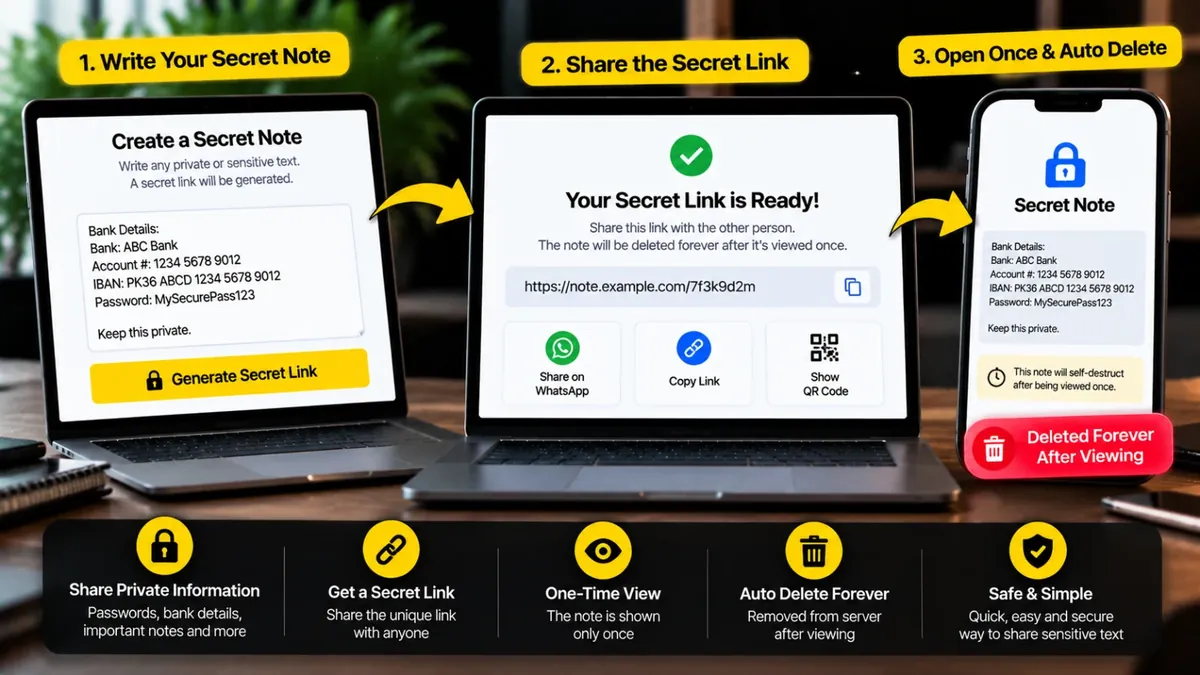
Password, bank details ya koi bhi khufia text likhein. Ek secret link milega. Dusra banda link khole to note dikhega aur server se hamesha ke liye delete ho jayega.
Password link ke saath mat bhejein. Kisi aur raste se batayein (jaise call ya doosra chat).
Dusre phone se scan karein.
Ya seedha wo link kholein jo aap ko bheja gaya hai.
Ye note ab dobara nahi khulega. Page band karne se pehle zaroori cheezein copy kar lein.
Note aap ke browser mein lock hota hai. Hamare server par sirf locked data jata hai, asal text nahi. Lock ki chaabi link ke # wale hissay mein hoti hai jo server ko bheji hi nahi jati. Gair-qanooni ya nuqsandeh content bhejna mana hai.
Secret Note lets you send a password, bank detail or any private text without leaving a copy in a chat or email. You write the note, optionally protect it with a password, and get a one-time link. When the other person opens the link, the note appears once and is then deleted from the server for good.
The note is locked inside your browser before it is sent, so our server only ever stores scrambled data. The key that unlocks it sits in the part of the link after the # sign, which your browser never sends to any server. That is why we cannot read your notes, even if we wanted to. Use it for short private messages, and always change a shared password once it has been used.
Roman Urdu mein: Koi private baat bhejni ho to note likhein, chahein to password lagayein aur ek-baar-khulne wala link share karein. Note aap ke browser mein lock hota hai aur ek baar parhne ke baad khud delete ho jata hai. Bohat hassas maloomaat (jaise bank pin) bhejne se bachein.
Type or paste the private text. You can write in English, Urdu or Roman Urdu.
Set a password if you want extra safety, then choose how long the note may wait: 1 hour, 1 day or 7 days.
Press the button, copy the link and send it. Send the password by a different route, such as a call.
The receiver taps the open button, reads the note, and it is deleted from the server at that moment.
Ji haan, bilkul free hai. Na signup chahiye na koi app install karni parti hai.
Nahi. Note aap ke browser mein lock hota hai aur server ko sirf locked data milta hai. Lock ki chaabi link ke # ke baad wale hissay mein hoti hai, jo browser server ko bhejta hi nahi.
Jaise hi dusra banda note kholta hai, wo usi lamhe server se hamesha ke liye delete ho jata hai. Agar koi na khole to 1 ghanta, 1 din ya 7 din (jo aap ne chuna) baad khud delete ho jata hai.
Zaroori nahi, lekin behtar hai. Bina password ke jis ke paas poora link hoga wo note khol sakta hai. Password lagayein aur usay link se alag raaste (jaise call) par bhejein.
Ghalat password par note delete nahi hota, lekin 5 ghalat koshishon ke baad note khud destroy ho jata hai taake koi guess na kar sake.
Ji haan. Aap ke page par nazar aata hai ke note khul gaya hai. Agar aap ne kholne se pehle note khula hua dekha to samjhein link kisi aur tak pohanch gaya, aur jo cheez bheji thi (jaise password) usay foran badal dein.
Nahi. Jo banda note khole wo usay copy ya screenshot kar sakta hai. Ye tool sirf ye yaqeeni banata hai ke note chat ya server par pada nahi rehta. Hamesha usi ko bhejein jis par aap bharosa karte hain.
Ek note mein 10,000 huroof tak likh sakte hain. Is mein sirf text jata hai, files nahi.
Ye aisa note hai jo link kholne par sirf ek baar parha ja sakta hai, phir delete ho jata hai. Link sirf us shakhs ko bhejein jisay note dena hai.
Agar aap ko is se zyada features chahiye hon to ye premium tools Saste Tools par sasti qeemat mein milte hain.